
Week 8 — Arrays and Objects
- Arrays are for collections.
- Objects are for encapsulating attributes and behaviors.
Arrays
Arrays make code more modular and store a bunch of variables in one place.
Instead of this…
var firstPoint = 10;
var secondPoint = 20;
var thirdPoint = 30;
we can do this.
// square brackets ⟶ declaring an array
var points = [10, 20, 30];- Arrays in javascript are comma separated lists of data.
- Arrays can store numbers, strings, booleans or even objects.
- Each element is referenced by its index ⟶ the place at which the element resides in the array.
- Index starts at 0. i.e., first element ⟶ points[0]
Adding elements to an array
- Using push ⟶ adds an element to the end of the array
var myFirstArray = [];

function setup() {
    createCanvas(500, 500);
    for (var i = 0; i < 5; i++) {
        myFirstArray.push(random(0, 100));
    }
    print(myFirstArray);
}- Using the iterator as index
var mySecondArray = [];

function setup() {
    createCanvas(500, 500);
    for (var i = 0; i < 5; i++) {
        mySecondArray[i] = i * 20;
    }
    print(mySecondArray);
}- Writing out the values ⟶ when the data is known ahead of time or there are only a few elements.
var myThirdArray = ["apple", "orange", "banana", "peach"];Accessing elements
// element at index i
var value = numbers[i];

// number of elements in the array
numbers.length;

// last element in the array
numbers[numbers.length - 1];
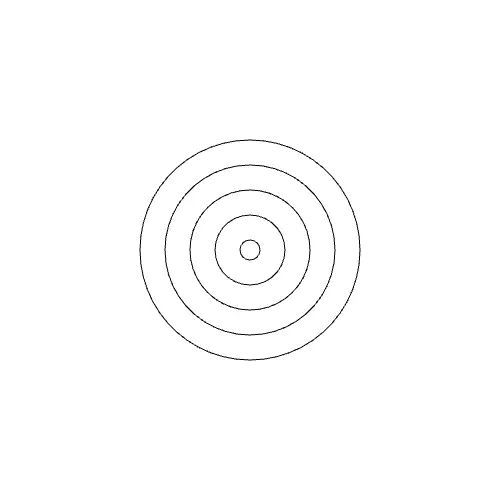
Example: Bullseye (code in folder /8.2-Arrays)
function draw() {
    background(255);
    noFill();
    for (var i = 0; i < mySecondArray.length; i++) {
        ellipse(width / 2, height / 2, mySecondArray[i] + 20, mySecondArray[i] + 20);
    }
}
Removing elements from an array
- shorten() ⟶ p5js function, removes the last element of the array.
shorten(myThirdArray);- splice() ⟶ removes specific element(s) from the array
// array.splice(start index, number of elements to remove)
var myArray = ["cat", 2, "dog", "turtle", "frog"];
myArray.splice(2, 1); // removes "dog"- splice() also returns a new array with the removed elements.
var spliced = myThirdArray.splice(0, 1);Code in folder /8.2-RemovingElements ⟶ click to remove the first element.
Note:
- Both shorten() and splice() change the original array.
- splice() is handy when the removed value is needed later.
Example: Circle radii
Create an array of radii and use it to draw circles of different radii.
var circleRadii = [10, 40, 25, 60, 80];

function setup() {
    createCanvas(400, 400);
}

function draw() {
    background(220);
    for (var i = 0; i < circleRadii.length; i++) {
        ellipse(50 + i * 75, height / 2, circleRadii[i] * 2);
    }
}
Objects
If a number of attributes, like speed, name and color are meant to be grouped together as one entity, they can be encapsulated in an object.
Array vs Object
// Array ⟶ square brackets, comma separated values
var myArray = [5, "red", "ball"];

// Object ⟶ curly brackets, comma separated key : value pairs
var particle = {
    speed: 5,
    color: "red",
    name: "ball",
};
Terminology
- Properties ⟶ attributes or the data of an object. eg., ears, nose, color, position of a dog.
- Methods ⟶ functions that operate on objects. eg., dog can walk, blink, look around.
There are two ways of creating objects in javascript.
- Object literals
- Constructors (classes)
Object literals
// Object name starts with an uppercase letter
var CustomObject = {
    propertyName: data,
    methodName: function () {
        // do something
    },
};

// access a property using dot notation
CustomObject.propertyName;

// call a method ⟶ remember the round brackets
CustomObject.methodName();
Example (code in folder /8.3-ObjectLiterals)
var Cat = {
    color: "brown",
    greeting: "purr!",
    sayHello: function () {
        // this ⟶ refers to the Cat object
        return this.greeting;
    },
};

function setup() {
    createCanvas(400, 400);
    textAlign(CENTER);
    var cat = Cat;
    text(cat.sayHello(), width / 2, height / 2);
}- Use object literals when only reading the properties of an object.
- Object literals are not good for writing new values.
- var cat2 = Cat is not a copy. Both refer to the same object. So, changing cat2.color also changes cat.color.
Constructors (Classes)
- For objects that do computation, and when the values of each object need to change.
- Think of the class definition as a cookie cutter ⟶ new creates a cookie from it.
class Particle {
    // constructor ⟶ built in, runs when a new object is created
    constructor(pos) {
        // this ⟶ refers to the scope of the class
        this.name = "ball";
        this.color = "red";
        this.pos = pos;
        this.speed = 1;
    }

    // method
    bounce() {
        if (this.pos.y >= height || this.pos.y <= 0) {
            this.speed *= -1;
        }
        this.pos.y += this.speed;
    }
}

var ball;

function setup() {
    createCanvas(400, 400);
    // new ⟶ creates a new instance of the class
    ball = new Particle(createVector(random(width), random(height)));
}

function draw() {
    background(220);
    ball.bounce();
    fill(ball.color);
    ellipse(ball.pos.x, ball.pos.y, 50, 50);
}
Code in folder /8.3-BouncingBall
p5 Vector
- A representation of two or more dimensions. eg., x, y position.
- createVector(x, y) ⟶ creates a 2D vector
- Values are accessed by vector.x and vector.y
var pos = createVector(random(width), random(height));
print(pos.x);
print(pos.y);
Particle Systems
A particle system is a collection of many minute particles that together represent a fuzzy object. Over a period of time, particles are generated into a system, move and change within the system and die within the system. - William Reeves (1983)
- Lifespan ⟶ how long a particle lives on screen until it is destroyed.
- Emitter ⟶ the source of the particles. eg., top of a volcano.
Recipe
- Define a particle object.
- Create a bunch of instances of that particle (new Particle()).
- Add each of the instances to a collection ⟶ array. To keep track of position and lifespan of all particles.
- Do things with the particles ⟶ apply forces, change color etc., using methods.
Example: Simple Particle System (code in folder /8.4-ParticleSystem)
- A new particle is added on every mouse click.
- The particle fades from red to white over its lifespan and is removed from the array when it dies.
class Particle {
    constructor(pos) {
        this.name = "asteroid";
        // lerpColor needs a color, not a string
        this.color = color("red");
        this.pos = pos;
        this.speed = 1;
        this.lifespan = 255;
    }

    bounce() {
        if (this.pos.y >= height || this.pos.y <= 0) {
            this.speed *= -1;
        }
        this.pos.y += this.speed;
        if (this.lifespan > 0) {
            this.lifespan--;
        }
    }
}

var particles = [];

function setup() {
    createCanvas(400, 400);
    noStroke();
    particles.push(new Particle(createVector(width / 2, height / 2)));
}

function draw() {
    background(255);
    for (var i = particles.length - 1; i >= 0; i--) {
        var particle = particles[i];
        particle.bounce();
        // lifespan / 255 ⟶ lerp amount between 0 and 1
        fill(lerpColor(color(255), particle.color, particle.lifespan / 255));
        ellipse(particle.pos.x, particle.pos.y, 50, 50);
        if (particle.lifespan <= 0) {
            particles.splice(i, 1);
        }
    }
}

function mousePressed() {
    particles.push(new Particle(createVector(random(width), height / 2)));
}Note:
- Without removing dead particles, the array keeps growing and the sketch slows down.
- Loop backwards when splicing inside a loop, otherwise the element after the removed one is skipped.
- Parameters like name and color can be passed to the constructor to make different looking particles from the same class.
Inspiration: Murmuration ⟶ thousands of starlings flying together as one shape.
Example sketches
The p5 sketches for this week, from the course repo.
8.2 — Arraysrepo ↗
var myFirstArray = [];
var dataScale = 50;

function setup() {
  createCanvas(500, 500);
  print(myFirstArray);
  // Method 2 - adding elements using the iterator as index
  // Method 1 would be myFirstArray.push(i * dataScale);
  for (var i = 0; i < 5; i++) {
    myFirstArray[i] = i * dataScale;
  }
  print(myFirstArray);
}

function draw() {
  background(255);
  noFill();
  for (var i = 0; i < myFirstArray.length; i++) {
    ellipse(width / 2, height / 2, myFirstArray[i] + 20, myFirstArray[i] + 20);
  }
}
8.2 — Removing Elementsrepo ↗
var myThirdArray = ["apple", "orange", "banana", "peach"];
var spliced = [];

function setup() {
  createCanvas(500, 500);
  textAlign(CENTER);
}

function draw() {
  background(255);
  // first element of the array
  text(myThirdArray[0], width / 2, height / 2);
  // last element of the array
  text(myThirdArray[myThirdArray.length - 1], width / 2, height / 2 + 25);
  // element removed by splice
  text(spliced, width / 2, height / 2 + 45);
}

function mousePressed() {
  // splice(index, howMany) removes the first element and returns it in a new array
  spliced = myThirdArray.splice(0, 1);
  // shorten() would remove the last element instead
  // shorten(myThirdArray);
}
8.3 — Bouncing Ballrepo ↗
class Particle {
  constructor(pos) {
    this.name = "ball";
    this.color = "red";
    // p5 vector
    this.pos = pos;
    this.speed = 1;
  }

  bounce() {
    if (this.pos.y >= height || this.pos.y <= 0) {
      this.speed *= -1;
    }
    this.pos.y += this.speed;
  }
}

var ball;

function setup() {
  createCanvas(400, 400);
  textAlign(CENTER);
  ball = new Particle(createVector(random(width), random(height)));
  print(ball.color);
  print(ball.pos.x);
}

function draw() {
  background(220);
  ball.bounce();
  fill(ball.color);
  ellipse(ball.pos.x, ball.pos.y, 50, 50);
  fill(255);
  text(ball.name, ball.pos.x, ball.pos.y);
}
8.3 — Object Literalsrepo ↗
var Cat = {
  color: "brown",
  greeting: "purr!",
  sayHello: function () {
    return this.greeting;
  },
};

function setup() {
  createCanvas(400, 400);
  textAlign(CENTER);
  var cat = Cat;
  var cat2 = Cat;
  // cat and cat2 refer to the same object, so changing cat2 changes cat as well
  cat2.color = "blue";
  print(cat.color);
  fill(cat2.color);
  text(cat.sayHello(), width / 2, height / 2);
}
8.4 — Particle Systemrepo ↗
class Particle {
  constructor(pos) {
    this.name = "asteroid";
    this.color = color("red");
    this.pos = pos;
    this.speed = 1;
    this.lifespan = 255;
  }

  bounce() {
    if (this.pos.y >= height || this.pos.y <= 0) {
      this.speed *= -1;
    }
    this.pos.y += this.speed;
    if (this.lifespan > 0) {
      this.lifespan--;
    }
  }
}

var particles = [];

function setup() {
  createCanvas(400, 400);
  textAlign(CENTER);
  noStroke();
  particles.push(new Particle(createVector(width / 2, height / 2)));
}

function draw() {
  background(255);
  // loop backwards so splice does not skip the next particle
  for (var i = particles.length - 1; i >= 0; i--) {
    var particle = particles[i];
    particle.bounce();
    // fade from red to white over the lifespan
    var particleColor = lerpColor(color(255), particle.color, particle.lifespan / 255);
    fill(particleColor);
    ellipse(particle.pos.x, particle.pos.y, 50, 50);
    fill(255);
    text(particle.name, particle.pos.x, particle.pos.y);

    if (particle.lifespan <= 0) {
      particles.splice(i, 1);
      print("particle removed!");
      print("number of particles in our array " + particles.length);
    }
  }
}

function mousePressed() {
  particles.push(new Particle(createVector(random(width), height / 2)));
}