
Week 4 — Color
This week is all about color and how to use color in P5js.
Colored Light
-
lowest visible frequency ⟸ red ⟹ longest wave length
-
highest visible frequency ⟸ violet ⟹ shortest wave length
-
White is even (uniform) distribution of color
-
Black is absence of Light
-
Subtractive color ⟶ mixing color pigments ⟶ dark brown/Black
-
Additive color ⟶ mixing colored light ⟶ approaches white
color
color(red,green,blue);- color takes 3 parameters ⟶ red channel, green channel, blue channel
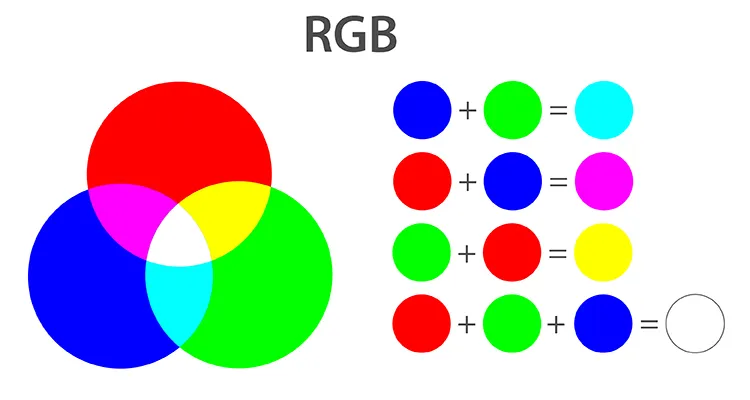
//color can also be specified in the following ways

// numbers
var c = color(255,0,0);
// strings
var c = color("rgb(100%,0%,0%)");
// hexadecimal
var c = color("#ff0000");
fill value
fill(255,0,0);  ⟶ RED fill color
fill(0,255,0);  ⟶ GREEN fill color
fill(0,0,255);  ⟶ BLUE fill color
Hue, Saturation and Brightness
- In p5js we can specify color representation mode to be HSB by calling color mode.
colorMode(HSB,Hue,Saturation,Brightness);Representation of colors in HSB mode.
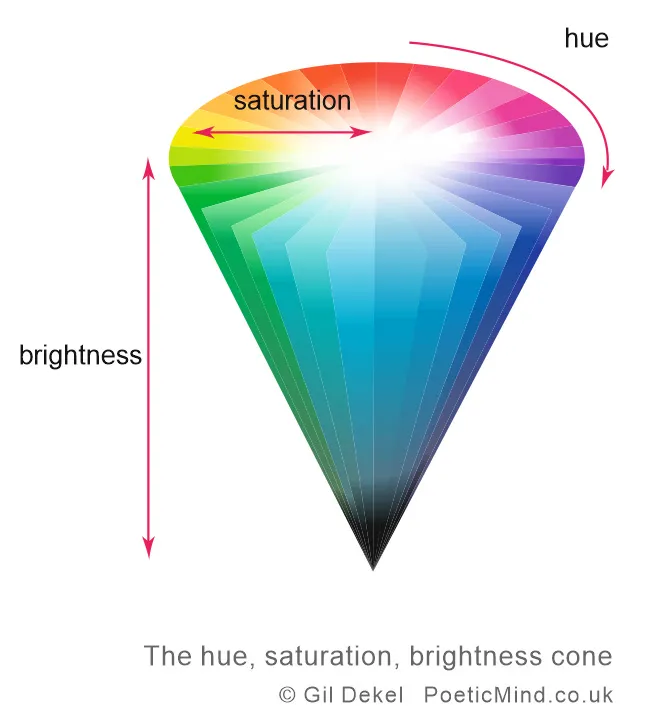
Note: In practice, the default maximum values of H,S, and B are as follows
- Hue = 360
- Saturation = 100
- Brightness = 100
Brightness is also frequently referred to as “Luminance”.
Color Wheels
This a representation of color in a graphical format
- 1666 ⟶ Science Boi Isaac Newton ⟶ Dispersion ⟶ Color deconstruction with prism
- Color Wheel
- 7 asymmetrical segments.
- Arranged complementary colors opposite to each other in a circle.
- Each side enhanced the other through optical contrast.
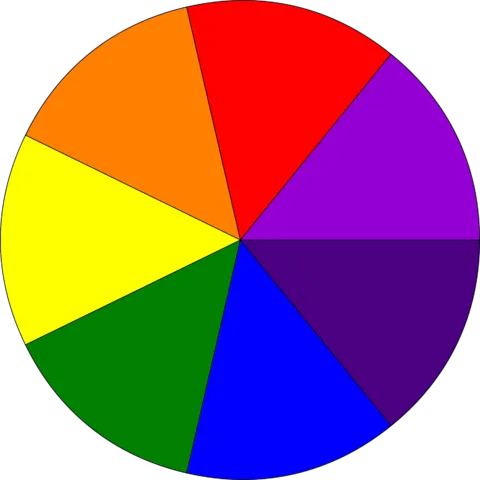
- FunFact: He did this with musical notes as well to suggest that like music colors could harmonize with each other (I don’t get either!)
Color Harmonies
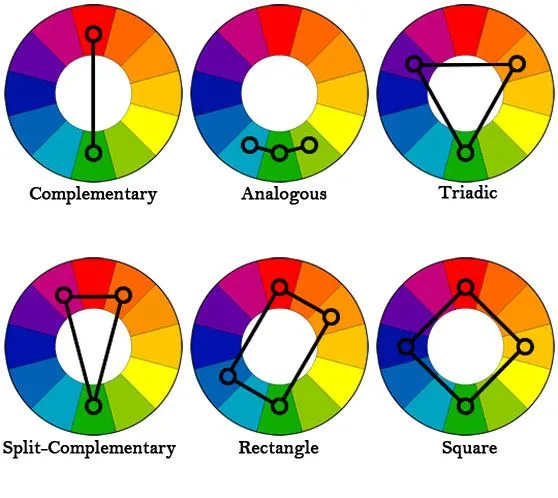
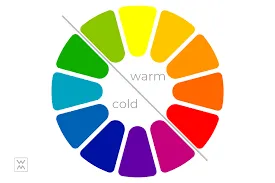
- Hue is the representation of the angle along the color wheel
- Numerically Analogous colors are less than 30 degrees
Beautiful Randomness
Note: Function keyPressed() in p5js constantly listens for a key press. If a key is pressed, then the code in the functions is executed.
More on this at keyPressed
/* This function is constantly listening for key press
If the pressed key is SPACEBAR (code ==> 32) new hue is computed and draw is called again.
*/
function keyPressed() {
    if (keyCode == 32) {
    // Code here is executed upon key press.
    }
}
Color Interpolation
Interpolation is a way creating a gradient between different values. It is transitioning from one color to another.
- One way of doing this is using the lerpColor() function in p5js.
- lerpColor() - Blends two colors to find a third color somewhere between them.
- More on this at lerpColor
lerpColor(colorFrom, colorTo, lerpAmount);

// 0 > lerpAmount > 1.0- Map function maps a value of a variable from one range to another.
var mappedValue = map(variable,inputMin,inputMax,outputMin,outputMax);Example sketches
The p5 sketches for this week, from the course repo.
4.2 — Colored Lightrepo ↗
function setup() {
  createCanvas(400, 400);
}

function draw() {
  background(255);

  // Additive color
  // Top Left
  var redColor = color(255, 0, 0);
  fill(redColor);
  rect(0, 0, width / 2, height / 2);
  //top right
  var greenColor = color(0, 255, 0);
  fill(greenColor);
  rect(width / 2, 0, width / 2, height / 2);
  /*
  Bottom rect
  mixColor = redColor + greenColor
  */
  var mixColor = color(
    red(redColor) + red(greenColor),
    green(redColor) + green(greenColor),
    blue(redColor) + blue(greenColor)
  );
  fill(mixColor);
  /*
  The same can be simply achieved by
    fill(255,255,0)
  */
  rect(0, height / 2, width, height / 2);
}
4.3 — Hue, Saturation, Brightnessrepo ↗
/*
  This Example also includes an exercise to make a color spectrum grid
*/
function setup() {
  createCanvas(360, 360);

  // Specify colorMode
  colorMode(HSB, 360, 100, 100);

  /*
    maximum Hue Value = 360
    maximum Saturation value = 100
    maximum Brightness value = 100
    */

  // background color
  background(45, 50, 100);

  fill(180, 100, 25);
  // specify rectMode
  rectMode(CENTER);
  rect(width / 2, height / 2, 100, 100);
}

function draw() {
  // Make a color spectrum grid
  noStroke();
  for (var i = 0; i < 360; i += 10) {
    for (var j = 0; j < 100; j += 10) {
      fill(i, j, 100);
      rect(i, j, 10, 10);
    }
  }
  noLoop();
}
4.5 — Beautiful Randomnessrepo ↗
/*
  This exercise uses random() function is generate analogous color palettes
*/
var numColumns = 5;
var colorRange = 60;
var h = 0;

function setup() {
  createCanvas(800, 800);
  colorMode(HSB, 360, 100, 100);
  noStroke();

  // noLoop used here because keyPressed is used to call the draw function when needed.
  noLoop();
}

function draw() {
  for (var i = 0; i < numColumns; i++) {
    var randomHue = random(h - colorRange, h + colorRange);
    fill(randomHue, 60, 100);
    rect((i * width) / numColumns, 0, width / numColumns, height);
  }
}

// This function is constantly listening for key press
function keyPressed() {
  // If the pressed key is SPACEBAR (code ==> 32) new hue is computed and draw is called again.
  if (keyCode == 32) {
    h = random(0, 360);
    redraw();
  }
}
4.6 — Color Interpolationrepo ↗
/*
  Simple color Interpolation
*/

var numColumns = 19;
let colorFrom;
let colorTo;

function setup() {
  createCanvas(800, 800);
  colorMode(HSB, 360, 100, 100);
  noStroke();
  colorFrom = color(0, 50, 100);
  colorTo = color(45, 80, 100);
}

function draw() {
  for (var i = 0; i < numColumns; i++) {
    var interpValue = map(mouseX * (i * 0.15), 0, width, 0.0, 1.0);
    var colorHue = lerpColor(colorFrom, colorTo, interpValue);
    fill(colorHue, 100, 100);
    rect((i * width) / numColumns, 0, width / numColumns, height);
  }
}