
Week 12 — Image
All things images ⟶ load, position, tint, filter and manipulate pixels of images in p5js.
Images used this week are frames from the cat video in /Examples/1.2_VideoPixels ⟶ /assets
Loading and Displaying Images
- loadImage(path) ⟶ loads an image. Path is the exact location of the file. eg., “image.png” or “images/image.png”
- Load images in preload.
- image(img, x, y, width, height) ⟶ draws the image.
var img;

function preload() {
    img = loadImage("../assets/cat.jpg");
}

function setup() {
    createCanvas(640, 360);
}

function draw() {
    image(img, 0, 0, img.width, img.height);
}
- image() takes 4 more parameters ⟶ to draw a part (source rectangle) of the image.
// d ⟶ destination (canvas), s ⟶ source (image)
image(img, dx, dy, dWidth, dHeight, sx, sy, sWidth, sHeight);
Image Tint and Filter
Tint
- tint(r, g, b, alpha) ⟶ brings out certain colors of the image. eg., tint(255, 0, 0) ⟶ redder image.
- alpha ⟶ transparency.
- Inspiration ⟶ Andy Warhol’s screen prints. eg., Marilyn Monroe, Elvis. Basic colors are brought out and repeated.
Example: Warhol style (code in folder /12.3-Tint)
var catImg;
var numCats = 5;

function draw() {
    background(30, 90, 200);
    for (var i = 0; i < numCats; i++) {
        tint(i * 50, i * 20, 255 - i * 40, 150);
        image(catImg, i * 60, i * 20, catImg.width / 2, catImg.height / 2);
    }
}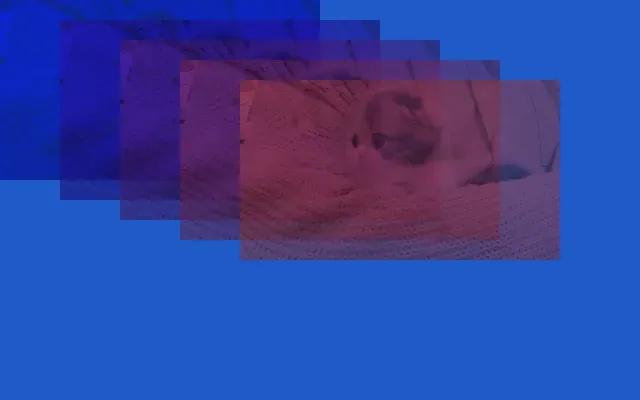
- Without alpha ⟶ looks like a collage. With alpha ⟶ looks like a screen print.
- img.width / 2 ⟶ resize to half the source image size.
- background(img) ⟶ draws an image as the background (image must be the same size as the canvas).
Filter
- filter(MODE, level) ⟶ applies a filter to the canvas. Call it after image().
// level 0 to 1 ⟶ pixels above the level are white, below are black
filter(THRESHOLD, map(mouseX, 0, width, 0, 1));

// level 2 to 255 ⟶ number of colors per channel. Most visible between 2 and 5
filter(POSTERIZE, 3);

// film negative. No level
filter(INVERT);

// black and white
filter(GRAY);
Aspect ratio ⟶ ratio between width and height. Keep it while resizing, otherwise the image is stretched.
var resizedHeight = (img.height * width) / img.width;
image(img, 0, 0, width, resizedHeight, 0, 0, img.width, img.height);
Code in folder /12.3-Filter
- Public domain images and art ⟶ Wikimedia Commons. eg., Venus of Urbino by Titian.
Image Pixels
Copy
- img.copy() ⟶ copies a part of the image and pastes it somewhere else. Like select and copy in Photoshop.
// source image, source selection (x, y, w, h), destination (x, y, w, h)
img.copy(srcImage, sx, sy, sw, sh, dx, dy, dw, dh);
Example: Glitch art ⟶ misaligned bands (code in folder /12.4-Copy)
var bandMisalign = 60;
var bandHeight = 20;

function setup() {
    createCanvas(640, 360);
    for (var i = 0; i < img.height; i += bandHeight) {
        img.copy(img, 0, i, img.width, bandHeight, random(-bandMisalign, bandMisalign), i, img.width, bandHeight);
    }
}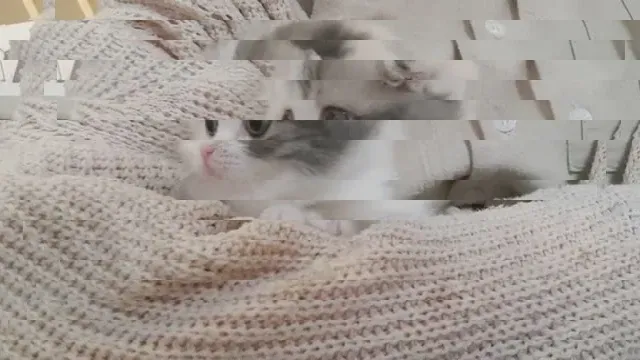
- Larger bandMisalign ⟶ bigger shifts. Smaller bandHeight ⟶ more bands.
- New random image on every refresh ⟶ generative image.
Pixels
- img.get(x, y) ⟶ color of the pixel at x, y.
- All the pixels of an image can become data.
- Large images ⟶ a lot of computation. Use smaller images or skip pixels (larger step).
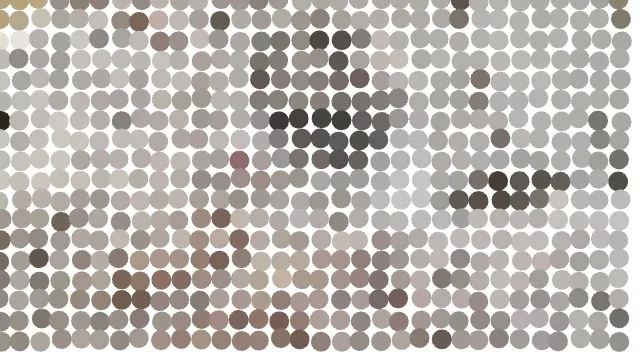
Example: Pixels to ellipses (code in folder /12.4-Pixels)
var step = 20;

function draw() {
    background(255);
    for (var x = 0; x < img.width; x += step) {
        for (var y = 0; y < img.height; y += step) {
            fill(img.get(x, y));
            // random offset ⟶ not exactly on a grid, looks more natural
            ellipse(x + random(-2, 2), y + random(-2, 2), step, step);
        }
    }
}- noLoop() in setup ⟶ draws once. Otherwise the random offsets change every frame.
Animated Images or Sprites
- Sprite ⟶ a single image with all the frames of an animation. A different part of the image is drawn each frame.
- The eye doesn’t see the shift, it sees movement.
- Common technique in animation. Easy for the computer and low on memory.
- Successor of Eadweard Muybridge’s animal locomotion studies (1800s) ⟶ successive photographs of animals and people in motion played back quickly.
Example: Sprite sheet (code in folder /12.5-SpriteSheet)
var numFrames = 8;

function setup() {
    createCanvas(400, 400);
    frameW = spriteSheet.width / numFrames;
    frameH = spriteSheet.height;
    frameRate(8);
}

function draw() {
    background(255);
    var index = frameCount % numFrames;
    image(spriteSheet, 0, 0, frameW, frameH, index * frameW, 0, frameW, frameH);
}
Example: Image sequence (code in folder /12.5-ImageSequence)
var frames = [];

function preload() {
    for (var i = 0; i < 12; i++) {
        // nf(i, 3) ⟶ number to string with 3 digits. 1 ⟶ "001"
        frames.push(loadImage("../assets/cat-sequence/cat_" + nf(i, 3) + ".png"));
    }
}

function draw() {
    background(255);
    image(frames[frameCount % frames.length], width / 2, height / 2);
}p5.play library
- p5.play ⟶ library for sprites and image sequence animations.
- loadAnimation(first image, last image) ⟶ finds all the numbered images in between.
var ballerina;

function preload() {
    ballerina = loadAnimation("assets/ballerina_000.png", "assets/ballerina_012.png");
}

function draw() {
    background(255);
    animation(ballerina, width / 2, height / 2);
}- The examples above do the same thing without the library.
Other Tools for Working with Images
-
jsfeat ⟶ feature detection. eg., edges, stitching images together based on features.
-
imagetracer.js ⟶ traces an image into vectors. Like tracing in Illustrator.
-
Command line tools
- FFmpeg ⟶ convert images, image sequence to a movie and back.
- ImageMagick ⟶ convert, resize, stitch images.
# the sprite sheet and image sequence in /assets were made from a video like this
ffmpeg -ss 26 -t 1.6 -i cat.mp4 -vf "fps=5,scale=160:-1,tile=8x1" -frames:v 1 cat-sprite.png
ffmpeg -ss 26 -t 2.4 -i cat.mp4 -vf "fps=5,scale=320:-1" -start_number 0 cat_%03d.png
Example sketches
The p5 sketches for this week, from the course repo.
12.2 — Load Imagerepo ↗
var img;

function preload() {
  img = loadImage("../assets/cat.jpg");
}

function setup() {
  createCanvas(640, 360);
}

function draw() {
  background(220);
  // image(img, x, y, width, height)
  image(img, 0, 0, img.width, img.height);
}
12.3 — Filterrepo ↗
var img;

function preload() {
  img = loadImage("../assets/cat.jpg");
}

function setup() {
  createCanvas(640, 400);
}

function draw() {
  background(255);
  // keep the aspect ratio while fitting the canvas width
  var resizedHeight = (img.height * width) / img.width;
  // image(img, dx, dy, dWidth, dHeight, sx, sy, sWidth, sHeight)
  image(img, 0, 0, width, resizedHeight, 0, 0, img.width, img.height);
  // filter comes after image
  filter(THRESHOLD, map(mouseX, 0, width, 0, 1));
  // filter(POSTERIZE, map(mouseX, 0, width, 2, 5));
  // filter(INVERT);
  // filter(GRAY);
}
12.3 — Tintrepo ↗
// Andy Warhol style screen print
var catImg;
var numCats = 5;

function preload() {
  catImg = loadImage("../assets/cat.jpg");
}

function setup() {
  createCanvas(640, 400);
}

function draw() {
  background(30, 90, 200);
  for (var i = 0; i < numCats; i++) {
    // tint(r, g, b, alpha) ⟶ alpha for transparency like a screen print
    tint(i * 50, i * 20, 255 - i * 40, 150);
    image(catImg, i * 60, i * 20, catImg.width / 2, catImg.height / 2);
  }
}
12.4 — Copyrepo ↗
// glitch - misaligned bands
var img;
var bandMisalign = 60;
var bandHeight = 20;

function preload() {
  img = loadImage("../assets/cat.jpg");
}

function setup() {
  createCanvas(640, 360);
  for (var i = 0; i < img.height; i += bandHeight) {
    // img.copy(src, sx, sy, sw, sh, dx, dy, dw, dh)
    img.copy(
      img,
      0, i, img.width, bandHeight,
      random(-bandMisalign, bandMisalign), i, img.width, bandHeight
    );
  }
}

function draw() {
  background(255);
  image(img, 0, 0);
}
12.4 — Pixelsrepo ↗
var img;
var step = 20;

function preload() {
  img = loadImage("../assets/cat.jpg");
}

function setup() {
  createCanvas(640, 360);
  noStroke();
  noLoop();
}

function draw() {
  background(255);
  // larger step ⟶ fewer pixels to go through ⟶ faster
  for (var x = 0; x < img.width; x += step) {
    for (var y = 0; y < img.height; y += step) {
      // color of the pixel at x, y
      fill(img.get(x, y));
      // small random offset so it's not exactly on a grid
      ellipse(x + random(-2, 2), y + random(-2, 2), step, step);
    }
  }
}
12.5 — Image Sequencerepo ↗
// sequence of images cat_000.png to cat_011.png
var frames = [];
var numFrames = 12;

function preload() {
  for (var i = 0; i < numFrames; i++) {
    frames.push(loadImage("../assets/cat-sequence/cat_" + nf(i, 3) + ".png"));
  }
}

function setup() {
  createCanvas(400, 400);
  imageMode(CENTER);
  frameRate(10);
}

function draw() {
  background(255);
  image(frames[frameCount % numFrames], width / 2, height / 2);
}
12.5 — Sprite Sheetrepo ↗
// one image with 8 frames side by side
var spriteSheet;
var numFrames = 8;
var frameW;
var frameH;

function preload() {
  spriteSheet = loadImage("../assets/cat-sprite.png");
}

function setup() {
  createCanvas(400, 400);
  frameW = spriteSheet.width / numFrames;
  frameH = spriteSheet.height;
  frameRate(8);
}

function draw() {
  background(255);
  // shift the part of the image that is drawn each frame
  var index = frameCount % numFrames;
  image(spriteSheet, width / 2 - frameW, height / 2 - frameH, frameW * 2, frameH * 2, index * frameW, 0, frameW, frameH);
}