
Week 6 — Transformations
In this week, the topics covered are transformations. Transformation is of following types.
- Translations - moving origin from one point to another
- Rotation - Rotation about a origin point or an axis
- Scale - Changing the size of an object in various dimensions
Transformation
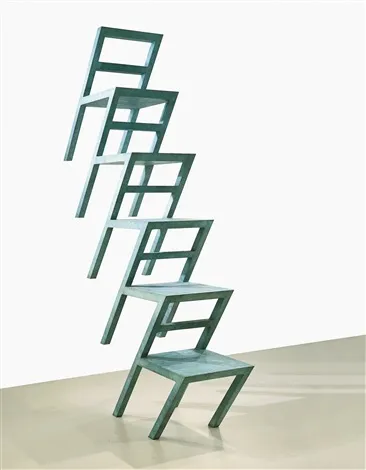
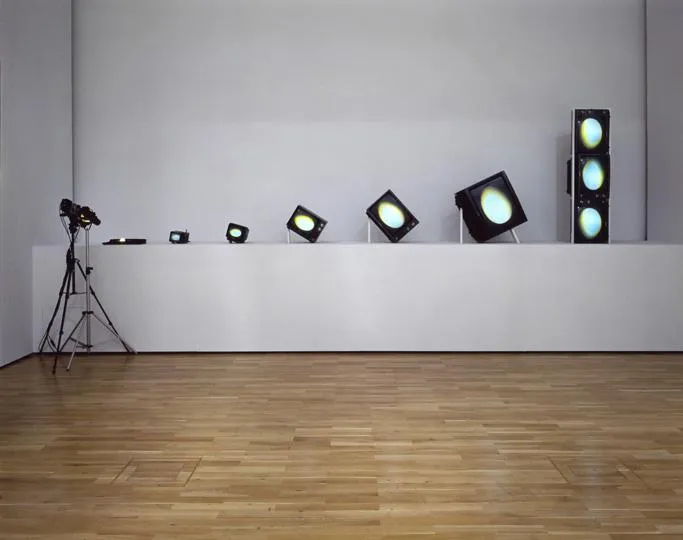
Examples of transformations in art
- Transformation - 20b by Lucas Samaras (Left) ⟶ Translation
- Egg Grows by Nam June Paik (Right) ⟶ Translates, rotates and scales.
Transformation functions in P5js
- Translate ⟶ moves canvas origin point to x and y values
translate(x, y);- Rotate ⟶ rotates next draw call by an angle in radians
rotate(angle);- Scale ⟶ scales the next draw call by a numerical factor greater than zero.
- The scale factor less than one scales down the drawing and greater than 1 scales up the drawing
scale(x,y); // x ⟶ scale factor in x axis, y ⟶ scale factor in y axisTranslations
Example
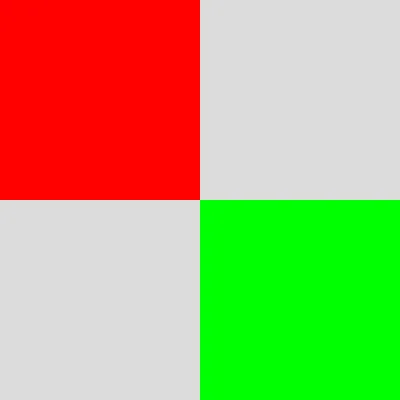
- Note: both red and green rectangles have same (0,0) coordinates. But the translate is called with the values (width/2, height/2).
function setup() {
    createCanvas(400, 400);
}

function draw() {
    background(220);
    noStroke();

    // Draw Rectangle 1
    fill(255, 0, 0);
    rect(0, 0, width / 2, height / 2);

    // Translate origin from top left to the center of the canvas
    translate(width / 2, height / 2);

    // Draw Rectangle 2
    fill(0, 255, 0);
    rect(0, 0, width / 2, height / 2);
}- Results in…
- Functions push() and pop() isolates the transformation to only the code between them. See code below
//execute code
push();
// do transformations
// execute code
pop();
// execute code- The transformations done is only limited to the code written between push and pop functions.
Rotations
Rotation angle in P5.js is measured in radians ⟶ (0, TWO_PI) instead of degrees ⟶ (0,360).
The conversion between radians and degrees can be done using the following functions.
// Radians ⟶ Degrees
var xDegrees = degrees(angle_in_radians);

// Degrees ⟶ Radians
var xRadians = radians(angle_in_degrees);
To set the default unit of measurement for angles, the function angleMode() can be used.
// For Degrees

setup(){
    createCanvas(400,400);
    angleMode(DEGREES);
}

// For Radians ⟶ This set by default so, its not required to specify for radians

setup(){
    createCanvas(400,400);
    angleMode(RADIANS);
}
Transformation Order ⟶ Translate first, rotate later (recommended order in practice)
Example for rotate()
function setup() {
    createCanvas(800, 800);
    // Set Default unit for angle
    angleMode(DEGREES);
    // Set rectangle origin to center of the rectangle
    // By default, it is at top left corner
    rectMode(CENTER);
}

function draw() {
    background(23);

    // translate before rotate
    translate(width / 2, height / 2);
    rotate(frameCount);

    // Rotate before translate
    /* rotate(frameCount);
    translate(width / 2, height / 2); */
    rect(0, 0, 50, 100);
}
Scale
- Scale ⟶ scales the next draw call by a numerical factor greater than zero.
- The scale factor less than one scales down the drawing and greater than 1 scales up the drawing
scale(x,y); // x ⟶ scale factor in x axis, y ⟶ scale factor in y axisExample
function setup() {
    createCanvas(400, 400);
}

function draw() {
background(255);
    var x = 0;
    while (x < 20) {
        push();
        translate(x * 20, height / 2);
        scale(x * 0.1);
        ellipse(0, 0, 10, 10);
        pop();
        x++;
    }
}
NOTE: Explore transformations and order of transformations for a deeper understanding.
Example sketches
The p5 sketches for this week, from the course repo.
6.3 — Translationsrepo ↗
function setup() {
  createCanvas(400, 400);
  colorMode(HSB, 360, 100, 100);
}

function draw() {
  background(200, 100, 30);
  fill(45, 76, 100);

  /*
  (x1,y1) ⟶ (-40,0)
  (x2,y2) ⟶ (40,0)
  (x3,y3) ⟶ (0,-40)
  */

  push();
  translate(mouseX, mouseY);
  triangle(-40, 0, 40, 0, 0, -40);
  pop();
  drawCoords();
}

/* Display coordinates */
function drawCoords() {
  text(mouseX + "; " + mouseY, 20, height - 45);
}
6.4 — Rotationrepo ↗
function setup() {
  createCanvas(innerWidth, innerHeight);
  background(0);
  // Set rectangle origin to center of the rectangle
  // By default, it is at top left corner
  rectMode(CENTER);
  // set no stroke
  noStroke();
}

function draw() {
  // translate before rotate
  translate(frameCount % width, frameCount % height);
  rotate(radians(frameCount));

  // rgba - red, green, blue, alpha
  fill(255, 255, 255, 4);
  rect(0, 0, 40, 80);
}

// Clear canvas on mouse pressed

function mousePressed() {
  background(0);
}
6.5 — Scalerepo ↗
function setup() {
  createCanvas(400, 400);
}

function draw() {
  background(255);
  var x = 0;
  while (x < 20) {
    push();
    translate(x * 20, height / 2);
    scale(x * 0.1);
    ellipse(0, 0, 10, 10);
    pop();
    x++;
  }
}